
Candy AI Shorts, Explained: How the Short-Video Feed Actually Works
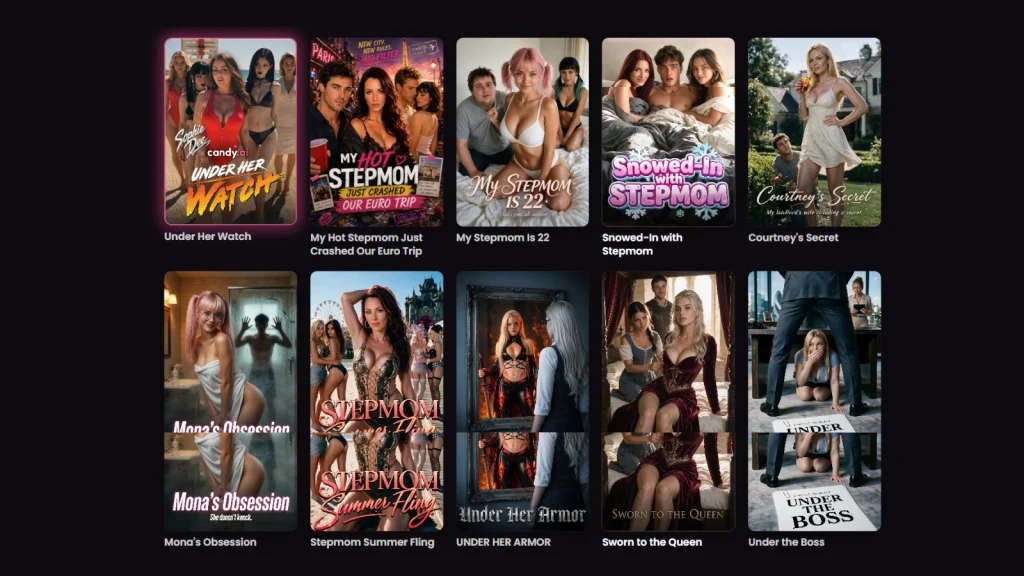
Candy AI Shorts is the feature most often described incorrectly. Article after article files it under “AI video generators”, which is precisely what it is not. Shorts is a playback surface — a catalogue of pre-produced episodes you scroll and watch — and Candy.ai runs entirely separate features for actually generating video. Getting that distinction right is the difference between understanding what you are looking at and being disappointed by it.
This article explains how Shorts works technically: what the content is, how it is structured, how it relates to your chat history, and where it sits among the four other video features Candy.ai shipped alongside it.
What Candy Shorts actually is
Candy.ai’s own documentation defines Shorts as short, AI-generated cinematic videos featuring its characters in scripted scenarios, designed as “quick, story-driven experiences you can watch without roleplaying through a full chat”.
Four properties come straight from that definition, and they tell you most of what you need to know:
- Pre-written scenes with a beginning, middle and end — this is authored content, not improvisation
- Under two minutes per episode
- Varying characters, themes and visual styles across the catalogue
- Separate from your chat conversations, so they do not affect your relationship or chat history with a character
That last point is the architecturally interesting one, and we will come back to it.
How the catalogue is structured
The Candy Shorts feed on Candy.ai is not an endless algorithmic stream in the TikTok sense. It is a browsable catalogue organised into series, each containing multiple episodes, and at the time of writing it lists 109 series in total.
Two independent filter axes sit above the grid. The first is a scope selector splitting the catalogue by who the characters are:
- All — the full 109 series
- Candy Creators — a distinct scope containing 7 series, served on its own URL parameter
- Candy characters — series built around the platform’s own roster
- Other characters
The second axis is thematic tagging — New, Spicy, Fantasy, Teacher, Maid, Wife, Taboo and a set of family-adjacent scenario tags. The two filters combine, and the interface reports the intersection explicitly, which is how the 109 figure is visible in the first place. We keep a running breakdown of the catalogue, including which series sit in the Candy Creators scope, on our dedicated Candy Shorts site.
Series carry status badges — NEW EPISODES on actively updated titles, SPICY on more explicit ones. Candy.ai states plainly that new Shorts are added over time but that it cannot guarantee a release schedule, which is worth knowing if you are considering following a series rather than binging a finished one.
The technical point everyone misses: Shorts has no per-user state
Everything else on a companion platform is stateful. Your chat history, your character’s memory of you, your relationship progression — all of it is per-user data that exists only for your account and changes as you use it.
Shorts is the exception. The episodes are rendered once and served identically to everyone. Nothing you do while watching writes back to a character’s memory, and the documentation is explicit that Shorts do not affect your relationship or chat history.
This has three practical consequences that matter more than they sound:
- No compute cost per view. A pre-rendered file streams like any other video, which is why watching does not burn the token balance that metered features consume.
- No personalisation. You cannot steer an episode, change its outcome, or have it reflect anything about you. It is the same film for every viewer.
- No continuity risk. Conversely, nothing in a Short can contaminate a character relationship you have built over months. The two systems never touch.
If you have wondered why Shorts feels qualitatively more polished than video you generate yourself, this is the answer. Pre-rendered content is produced once under controlled conditions; on-demand generation has to be fast and cheap enough to run per request.
Where Shorts sits among Candy.ai’s other video features
Shorts launched alongside four sibling features, all grouped under Candy.ai’s New Experiences section. Confusing them is easy, so here is the technical distinction:
| Feature | What it is | Generated on demand? | Token cost |
|---|---|---|---|
| Candy Shorts | Pre-produced scripted episodes you watch | No — pre-rendered | None to watch |
| Build Your Video | You pick character, action, location and partner from presets, then generate | Yes | Consumes generation |
| Interactive Stories (Neon Run) | Branching episodes where your choices shape the outcome | Partly — branching, not rendering | — |
| Candy Cam | Simulated live stream with a public chat plus private sessions | Yes, in session | Tips cost tokens; requests free in private chat |
| Candy Roulette | Random video-chat matching, skip or stay, own camera optional | Yes, in session | 5 tokens per minute |
Read that table as a spectrum from passive to interactive. Shorts is the passive extreme: zero input, zero cost, zero personalisation, highest production quality. Candy Roulette is the active extreme: fully interactive, metered by the minute, and necessarily rougher because it is being produced live.
Build Your Video is the one people actually mean when they search for a Candy AI video generator. It works on preset dropdowns rather than free-text prompting — you choose character, action, location and partner, hit generate, and the result lands in “My Generations”. Candy.ai warns in its own documentation that the output “may vary from the selected options”, which is the standard caveat for any diffusion-based generation and a useful expectation to carry into it.
Why a short-video feed exists on a chat platform at all
The product logic is worth spelling out, because it explains the design better than any feature list.
Companion platforms have a cold-start problem. A new user lands on a grid of hundreds of characters with no reason to prefer any of them, has to invent an opening line, and often leaves before the product has shown what it does. A scripted two-minute episode solves that: it demonstrates a character’s personality, voice and scenario with zero effort from the viewer, and every episode terminates in a character you can now go and talk to.
That is why Shorts costs nothing to watch while nearly everything else on the platform is metered. It is not generosity — it is the top of the funnel. Understanding that also tells you how to use it: treat the feed as a casting call. You are sampling characters and scenarios cheaply before committing tokens or conversation time to any of them. We break the catalogue down that way — by scenario and by character — in our episode-by-episode guides.
What to expect, and what not to
Length is a hard constraint, not a choice
Under two minutes per episode is short for narrative. Series structure is how the format compensates — a scenario unfolds across a run of episodes rather than within one. If you come expecting a self-contained story per clip, you will find them abrupt.
Scenario range is narrower than the tag list suggests
The filter bar offers a dozen thematic tags, but the catalogue clusters heavily around a handful of domestic and family-adjacent scenarios. If a specific niche is what you are after, filter before you scroll rather than assuming 109 series means 109 different premises.
Release cadence is not guaranteed
Candy.ai says so directly. Series marked NEW EPISODES are being updated now; that is not a commitment that they will continue to be. Treat an unfinished series as unfinished.
How to place Shorts when evaluating the platform
Shorts should not be the reason you choose a companion platform, and it should not be the reason you dismiss one either. It is a discovery layer — genuinely well produced, free to consume, and completely disconnected from the stateful part of the product where the actual companion experience lives.
The sensible way to use it is as a no-cost survey of what the character roster can do before you spend anything. Watch a few series across different tags, note which characters hold your attention, and only then open a chat with one of them on Candy.ai — at which point you are in the stateful half of the platform, where tokens, memory and relationship progression start to matter.
If you want to go deeper on individual series, episode counts and which scenarios are actually worth the time, that is what our dedicated Candy AI Shorts site is for.